Testing PortAudio

with No Comments

I don’t know what took me so long to do it, but I finally installed PortAudio so that I can actually use it in my prototype program. To make sure it works, I ran one of the example programs, “paex_sine”, which plays a sine wave for five seconds, and got the following output:

esly14@mc-1:~/Documents/git/edward1617/portaudio/bin$ ./paex_sine
PortAudio Test: output sine wave. SR = 44100, BufSize = 64
ALSA lib pcm.c:2239:(snd_pcm_open_noupdate) Unknown PCM cards.pcm.rear
ALSA lib pcm.c:2239:(snd_pcm_open_noupdate) Unknown PCM cards.pcm.center_lfe
ALSA lib pcm.c:2239:(snd_pcm_open_noupdate) Unknown PCM cards.pcm.side
bt_audio_service_open: connect() failed: Connection refused (111)
Play for 5 seconds.
ALSA lib pcm.c:7843:(snd_pcm_recover) underrun occurred
Stream Completed: No Message
Test finished.

I’m not entirely sure what is causing the errors to appear, but the sine wave still played just fine, so I’ll leave it alone for now unless something else happens along the way.

Now that I have all the libraries I need for my prototype program, all I need to do next is to make some changes to the demo program to suit my initial needs. I’ll also need to figure out how to compile the program once the code is done and then write my own Makefile.
Halloween Update

with No Comments

Accomplished since 10/28 post:

  • Completed the IRB form, pending approval by Charlie (most likely it will need revised but could be submitted by class on Wednesday)
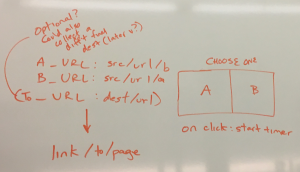
  • Drew a design of the minimal version of the program, more comprehensive design pending

img_7638

Next to work on:

  • Augment the minimal design by class on Wednesday
  • Produce the presentation for Wednesday’s class
  • Resume research and reading, the bulk of which I will probably do late in the week
  • Find JavaScript code for an existing (open-source) extension, save it, and hollow it out to serve as the foundation for the Chrome extension

Update 10/28/16

with No Comments

Currently still trying to compile the OpenCV facedetect.cpp file from the samples directory. I keep getting an error saying it cannot locate the libraries in the OpenCV.pc file. I am trying to get this resolved as soon as possible so I can use that program and begin working on the emotion detection portion of the project.

Kinect v1 Setup

with No Comments

The new (or should I say, old) Kinect finally arrived today, and plugging it into one of the USB 2.0 ports gives me the following USB devices:

Bus 001 Device 008: ID 045e:02bf Microsoft Corp.
Bus 001 Device 038: ID 045e:02be Microsoft Corp.
Bus 001 Device 005: ID 045e:02c2 Microsoft Corp.

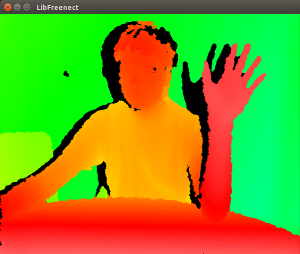
. . . which is still not completely identical to what freenect is expecting, but more importantly, I was finally able to run one of the freenect example programs!

Screenshot-from-2016-10-28-13_07_02.png

This is one-half of the freenect-glview program window, which shows the depth image needed to parse the body and subsequently the hand. I then dived into the tools that the XKin library provides, helper programs that let the user define the gestures that will be recognized by another program. With some experimentation, along with re-reading the XKin paper and watching the demo videos, I found out that the XKin gesture capabilities are more limited than I thought. You have to first close your hand to start a gesture, move your hand along some path, and then open your hand to end the gesture. Only then will XKin try to guess which gesture from the list of trained gestures was just performed. It is a bit of an annoyance since conductors don’t open and close their hands at all when conducting, but that is something that the XKin library can improve upon, and I know what I can work with in the meantime.

Work Log 10/19/2016-10/27/16

with No Comments

I spent this week charting out ER diagrams for a Facebook database schema. A lot of this work involved converting DDL statements I found online into a class diagram, and understanding how the classes related to each other. I am now at a point where I understand the entities and their relationships, and the next step is figuring out which of these entities I care about for my project.

I have also been using Mining The Social Web. This book is an overview of data mining popular websites such as Twitter, Facebook, and (interestingly as a social media site), LinkedIn. It even touches on the semantic web and the not-so-popular Google Buzz. Each area is covered with explanations on how to set up programs, a brief introduction to and explanation on the workings of the API, some examples of mining code and a couple of suggestions on how to use it.


I plan to use the data I am learning to harvest through these APIs to test and iteratively hone my data model. I’m currently working on charting out the ER diagram for Twitter, although this is proving trickier than it’s Facebook counterparts because I’ve only been able to find fragments of the model in different places.

v10.28

with No Comments

Catching up after traveling last week, I focused mostly on procedural bits for the project: opening an Overleaf project for the paper and getting the formatting/section headers right, researching Chrome extensions, and drawing some diagrams (about which more later).

I will focus on building up the paper for the next week. I also need to complete the IRB form (I’m about halfway through now) and the software design, which I intend to do by the time of the next class. Again see here for detailed timeline.

Update 10/27/16

with No Comments

I have begun work on testing how long it takes ffmpeg to compress certain files, and how effectively it compresses files at certain key frame sizes.

I have also been working on compiling the program’s source code so I can work on modifications, but I haven’t yet succeeded at that.

Program Design and Progress

with No Comments

While I am waiting for the Kinect to arrive in the mail, hopefully by tomorrow, I have been planning out the structure of my program and what exactly it is going to do. More will be added and revised as the gestures and musical output get more complex, but the foundation and the basic idea is, or at least should be, here.

design.txt

Also, I was able to successfully push to my Gitlab repository from my computer (the one I borrowed from the Turing lab) after adding an SSH key. Check out what I have so far!

https://gitlab.cluster.earlham.edu/seniors/edward1617

Update 10/26/16

with No Comments

After further researching open-source projects and tools that are available to me, I have decided that I will instead focus on ffmpeg.  It is similar to Xvid in the sense that it is an open-source project that provides codecs for compressing and decompression data, but it has better documentation and seems easier to work with.

I have also attained several sample files and have begun experimenting with how well ffmpeg compresses them.  In order to test their compression algorithms as best as possible, I have many different types of videos for performing testing on.  One video is a black screen, and it compresses quite nicely, which makes since given that there is little randomness is the video.  Another video, which involves confetti falling, compresses poorly, since the video is much less predictable.  I plan to continue to experiment to see what ffmpeg excels at and struggles with, and I will study and evaluate its source code.

Work Progress For This week

with No Comments

I played around with Wikitude and Vuforia SDKs and tested the sample examples that they gave. The next step would be testing how well each platform can recognize the target image. I have talked with Xunfei about how I should test these on certain scenarios like when there are multiple recognizable objects are in the view of the camera.

I will also start collecting important data and information that would be superimposed onto the screen when the object is recognized. Implementation of the application will be started shortly after I compare the test results of the two SDKs and decide which SDK to use.

Building a Chrome Extension

with No Comments

Never done it before, but Google’s guide here is a good start.

I was traveling late last week with some Physics research students, so my accomplishments for this project this time around are sparser than in the past. I’ll sit down tomorrow or Thursday to sketch out a design on whiteboard for how the process should work.

It looks straightforward enough to get started. That’s good, both because in the short time available I can implement something and because, if I have to change to a webpage or the like, I will likely be able to preserve some of the design without having been too bogged down in details.

Some other notes:

  • Thanks to hackathon-winning Earlham students Eli Ramthun and Flannery Currin for help getting started.
  • I see we’re going to start posting project updates daily starting tomorrow, which should be valuable.

Setup Complications Part 2

with No Comments

Thanks to Charlie, I added a 2-slot PCI Express USB 3.0 Card into the PC, and now instead of these devices from the Kinect:

Bus 001 Device 006: ID 045e:02c4 Microsoft Corp.
Bus 001 Device 003: ID 045e:02d9 Microsoft Corp.

I get these:

Bus 004 Device 003: ID 045e:02c4 Microsoft Corp.
Bus 004 Device 002: ID 045e:02d9 Microsoft Corp.
Bus 003 Device 002: ID 045e:02d9 Microsoft Corp.

. . . which is unfortunately still not what I’m looking for when compared to what freenect expects. Not surprisingly, I still couldn’t run the example programs with the Kinect through the new ports either. So the next step is to wait for the v1 Kinect to arrive. I would start writing the program now, but I hesitate to run into more problems if I’m not able to test the program at every step.

Setup Complications

with No Comments

My biggest fear for this project is being able to setup the hardware and software libraries in such a way that they would be able to work together. In terms of installing the libraries, I ran into a few complications that I had to manually fix myself, but thankfully, there weren’t any major issues I couldn’t solve.

The hardware, however, is a different story, since I couldn’t get the Kinect to be detected by the example programs. It turns out that according to a thread in the OpenKinect Google Group, the second version of the Kinect (v2), which is what the music department has now, doesn’t actually sends infrared images through USB instead of the depth data that libfreenect expects to receive. Moreover, OpenKinect says that I should be seeing the following USB devices through the “lsusb” command:

Bus 001 Device 021: ID 045e:02ae Microsoft Corp. Xbox NUI Camera
Bus 001 Device 019: ID 045e:02b0 Microsoft Corp. Xbox NUI Motor
Bus 001 Device 020: ID 045e:02ad Microsoft Corp. Xbox NUI Audio

Instead, I just get:

Bus 001 Device 006: ID 045e:02c4 Microsoft Corp.
Bus 001 Device 003: ID 045e:02d9 Microsoft Corp.

To complicate things even further, the v2 Kinect connects through USB 3.0, but the CS department computers only have USB 2.0 ports. We are currently finding a USB 3.0 to 2.0 adapter to see if that changes anything, but I just ordered a v1 Kinect myself as a backup plan. Time is running short and I’m already falling behind schedule.

Timeline & Design

with No Comments

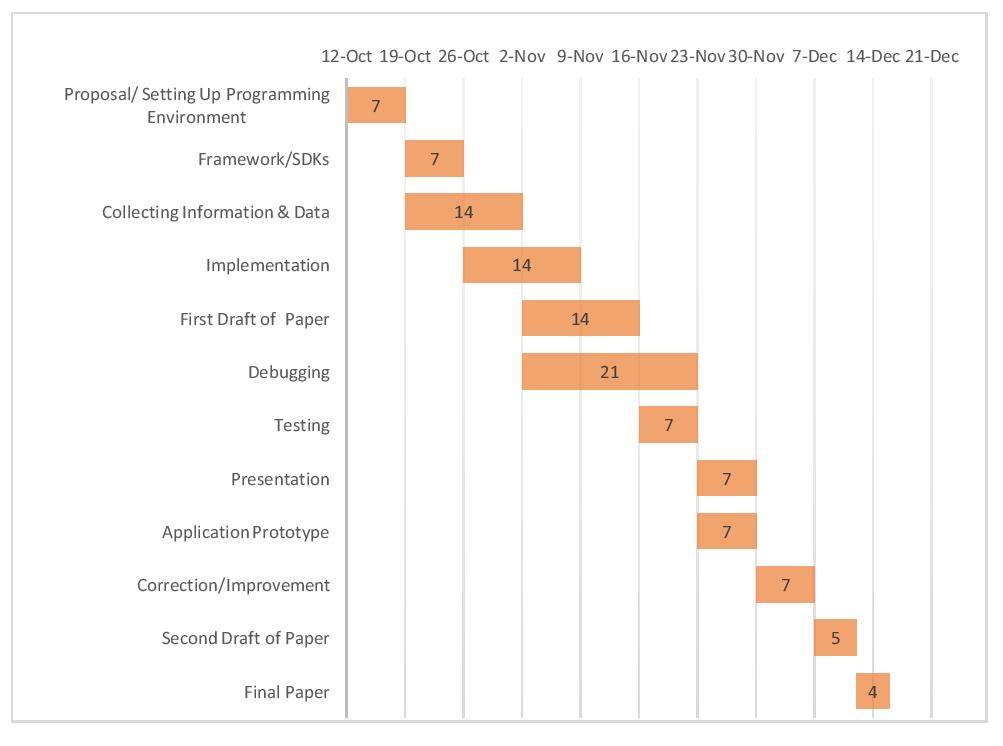
This is my estimated timeline for this semester.

Timeline

I have also included my literature review and project proposal too.

Literature review – LiteratureReview_SawYan

Project Proposal – Proposal_SawYan


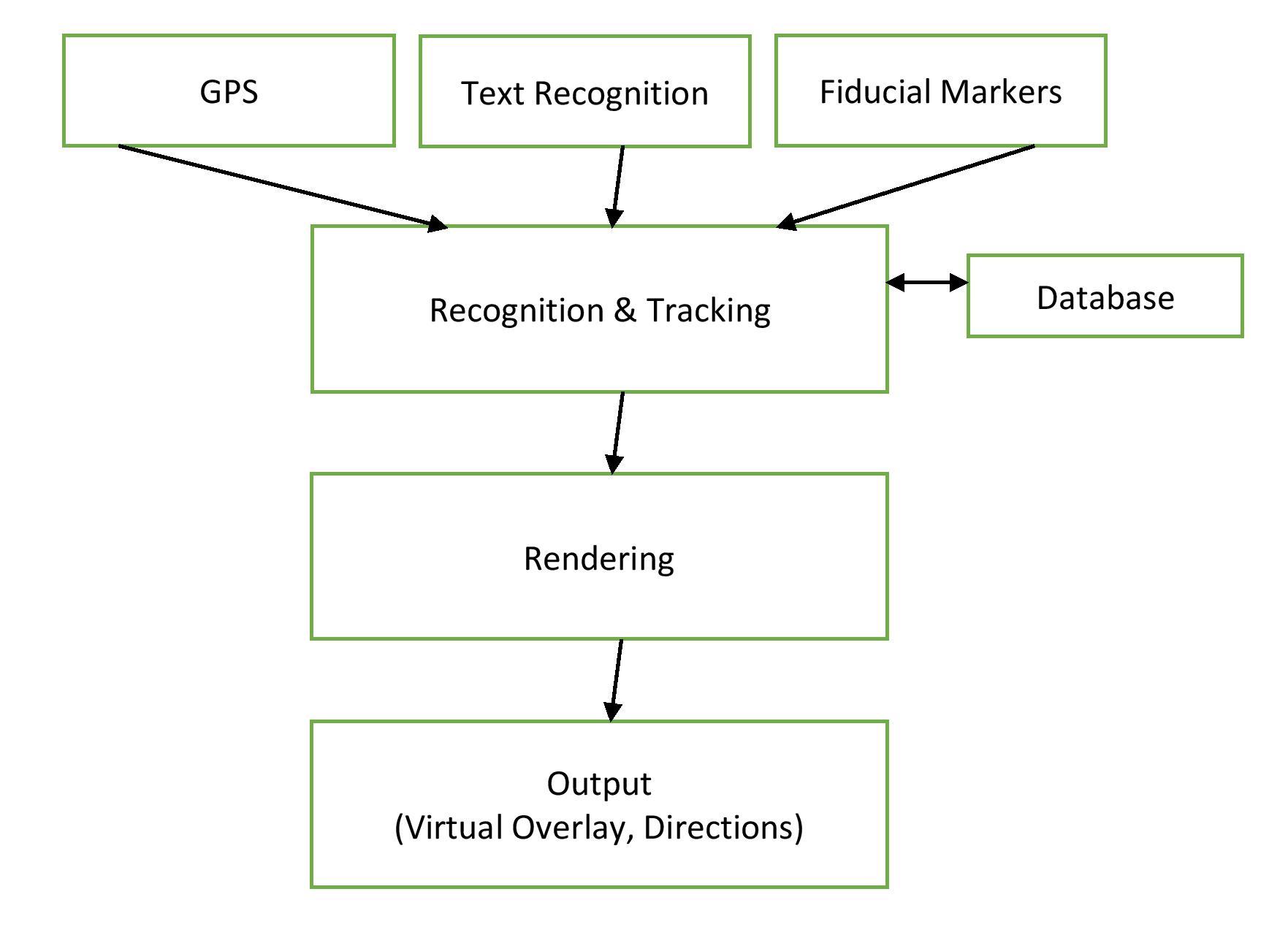
The following is the design flowchart for EARL: mobile app for better campus experiences. Input information will come from GPS, Text and markers when the device recognize them and it will be fed into the device for tracking. Then the device will look for the relevant virtual overlay for that object in the database. For finding the correct one, the application will render the virtual information and show it on the screen as an output.

Draft Design

Project Proposal

with No Comments

presentation-3

project-proposal

I have completed my project proposal and powerpoint.  Below is the timeline I have constructed for my project.

  • October 21: Be familiarized with the Xvid codec, how it works, and how to make simple modifications to it to change compression.
  • November 6: Have unique, decently working, personal compression algorithm. At this point I will have explored Xvid and experimented with ideas for some time, so I hope to have added some of my own ideas to the codec.
  • November 8: Complete a general outline of the paper to serve as a guide.
  • November 16: Complete the first draft of the paper.
  • November 30/December 4: Be prepared for project presentation.
  • December 12: Finish second draft of paper.
  • December 16: Finish final draft of paper and software.

Progress Update as of 10/19/16

with No Comments

I’ve obtained an Arduino uno board and have been working and messing around with the sensors given to me.

Also, I have obtained a Watts up meter and have watched and measured the voltage used during different cycles and different machines.  I have arrived at the conclusion that any Voltage over 100V indicates that a machine is running.

Up next is getting a voltage or current sensor for the Arduino board and working to connect the board to the wifi.

Project Design and Proposal

with No Comments

The current version of the proposal, which includes my revised thoughts from the survey paper as well as the design and timeline of the project:

Proposal.pdf

Presentation-3.pdf

Deadlines:

  • October 26: Develop a preliminary test build for the application by learning a simple gesture and controlling the playback of a sawtooth wave.
  • November 2: Add more complex gestures, particularly conductor gestures, and add more control over the sawtooth wave accordingly.
  • November 9: Integrate JACK for routing gesture messages to LMMS for integration with VST instruments and synthesizers.
  • November 16: Complete the first draft of the paper.
  • November 23: Continue working on application. Complete outline for the poster.
  • November 30 or December 4: Presentation
  • December 12: Complete the second draft of the paper.
  • December 16: Complete the final draft of the paper.


Project Design

with No Comments

First, the documents.

The proposal outlines some research on HCI, in addition to a proposed browser extension (Chrome) to facilitate easier interface comparison tests on the scale of academic and independent developers. I will complete an IRB form and a (visual) sketch of the software logic for upload by the time of the next class.

Revised timeline, copied from the proposal:

  • October 26: Software design complete (i.e. the design is robust enough to implement a preliminary version with no additional design); submit form to the IRB in the event the software is complete enough to test
  • November 2: Paper fully outlined and key topics un- derstood
  • November 9: Initial software written; poster outlined
  • November 16: First draft completed and handed in
  • November 30: Be prepared to present (may also end up presenting December 4)
  • December 12: Second draft complete
  • December 16: Final draft complete, best version of software done

These, as always, are subject to revision.

current approach: GeoBurst method

with No Comments

The GeoBurst algorithm detects local news events by looking for spatiotemporal ‘bursts’ of activity. This cluster analysis uses methods which look at geo-tag clusters of phrases.

Phrase network analysis has been able to historically link user clouds, however the use of GPS in mobile devices has led many users of social media to indicate their wherabouts on a reliable basis. Clusters appear not only in the spatial proximity of phrases, but also in their temporal proximity. This is being compared to a recent history which is sampled from a ‘sliding frame’ of historic phrases.

Possible changes may emerge as I rework the sampling process, in order to account for larger historic contextualization from previous years of data, in order to compare seasonal events, such as famous weather systems or sports. In the case of my research, the events are sports (specifically Football). This is because sports are temporal events on Twitter which happen in a simultaneous manner in the USA, giving me lots of clusters to look at. Though politics would be a fun topic, it is not resolved well in my dataset which dates to 2013.

The pursuit of GeoBurst is eventually to work towards disaster relief, however the behaviour of humans may arguably not be directed to social media in some disasters. The objective being that existing cyberGIS infrastructure may benefit from social media and be used to inform disaster response decision making.

In the mean time, it’s time to get GeoBurst running and looking at the Twitter API.

Gitlab

with No Comments

We use a self-hosted gitlab page for the Applied Groups and other internal CS work. All seniors have an account, which they can access through gitlab.cluster.earlham.edu upon receiving an email with your password.

If you haven’t worked with git, it’s good to learn now. Version control through git is ubiquitous in software development, so knowing how to do it before you graduate is valuable. A few tutorials:

We’ll add more. Command-line git is installed on cluster, so you can use that if you don’t want to install it on your local device.

If you have your own GitHub or similar account, please let us know and we can probably work with it.

One technical note you’ll need to know if you’re just getting started: when you log in to create your project, to create a local copy of it that you can update…

  • Add your ssh key for whatever machine you’re on (local, cluster, etc.) to your gitlab profile.
  • On the project homepage, make sure SSH is selected
  • copy the URL
  • On your local terminal, someplace in your home space, type:
    git clone <URL> <directory name>

If it worked, you should not be prompted for a password and should see text describing the cloning process. If there is an error, ask someone to help. See tutorials for details of how to do work.

Next Steps

with No Comments

I’ve been trying to figure out which libraries and frameworks are best for developing my Kinect application on Linux, and without testing any of the libraries I’ve found for compatibility so far, the search has been really difficult. This paper provides one possible setup, using:

  • openFrameworks for essential libraries such as OpenGL, a choice number of audio libraries, and a font library
  • ofxOpenNI module, a wrapper for:
    • OpenNI, providing access to the Kinect device and extracting the video stream (unfortunately, the original website was shut down, but there is this site instead)
    • NITE, providing the skeleton tracking capabilities (also shut down with OpenNI)
    • SensorKinect

I’ll look for other papers that have developed Kinect applications and check which of these libraries are absolutely necessary, if at all.

UPDATE: libfreenect (to replace OpenNI) and XKin (to replace NITE) seem to be attractive open-source alternatives.

Break Update

with No Comments

I spent some time over break reading The Design of Everyday Things, the first work of popular literature on user design I’ve read for this project. I’m about a third of the way through – it’s a quick and illuminating read – and I’ll finish the relevant sections soon. Some of his insights will certainly be included in the final product.

I want to move onto Ralph Caplan and a bit from Tufte this week, then spend next week focusing on the software component.

Basic idea right now:

  • October: design, read, annotate, brainstorm, pick algorithms/data structures/languages –> outline and program specs
  • November: write and revise, implement –> complete paper, draft of the associated poster, working code base
  • December: polish and present

There will of course be overlap.

Also, our gitlab group is set up and we should all have our individual project repos set up soon.